
RockIn Rock&Meteorite Identify
PlantInLifestyle
4.4217.00 Reviews
- Version
- 1.19.1
- Installs
- 100.00K
- Age Rating
- Everyone
Screenshots
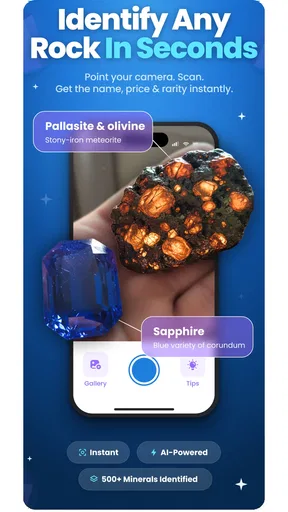
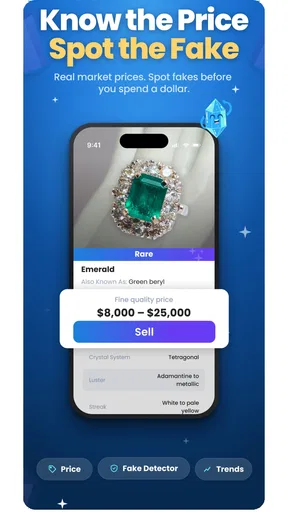
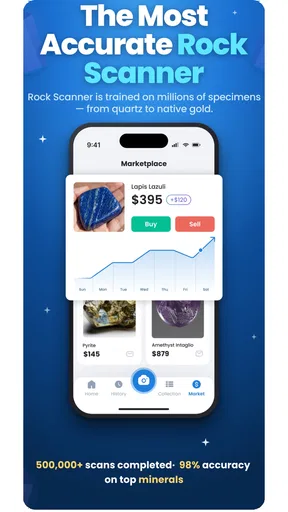
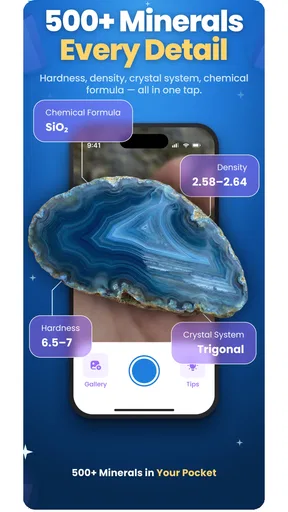
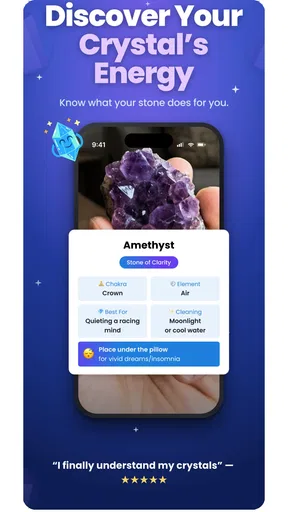
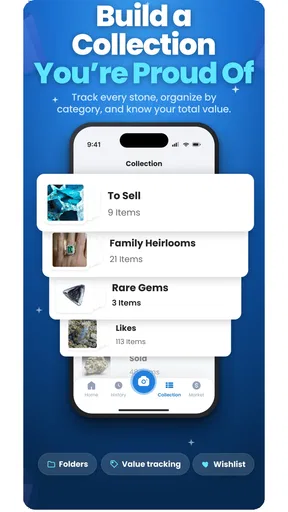
Our Review of RockIn Rock&Meteorite Identify
 Analysis by Appyee
I approached RockIn Rock&Meteorite Identify as a practical companion for anyone who keeps finding interesting stones and wants a more organized way to learn about them. Developed by PlantIn, this free lifestyle app is aimed at turning a loose collection of rocks, minerals, and possible meteorites into something easier to identify, record, explore, and potentially trade. My overall impression is that its value depends less on a single identification result and more on whether you use it as part of a careful collecting routine.
The app is available to everyone and has attracted over one hundred thousand installs, with an average rating of 4.4 from around three thousand ratings. Those figures suggest that it has found a real audience among casual collectors and curious beginners. It is also a relatively new entry, released in January 2026, so I would approach it as a developing collection tool rather than a replacement for a specialist geologist, museum reference, or laboratory analysis.
Where new users are most likely to get stuck
The first point of friction is deciding what to photograph. A rock rarely presents itself like a clean product image. It may be dusty, wet, partly covered by soil, scratched, reflective, or surrounded by other stones that confuse the visual context. If I point the phone at a cluttered handful of specimens, I am asking any identification tool to solve several problems at once. A single stone, placed on a plain surface, gives the app a much better starting point.
This matters especially with ordinary-looking material. Many minerals share similar colors, while weathering can hide the features that make one specimen different from another. A reddish stone may owe its appearance to iron staining rather than being a naturally red mineral. A dark, glossy fragment may be volcanic rock, industrial material, or something else entirely. I treat the result as a useful lead, not as proof.
Another likely stumbling block is expecting the app to settle the meteorite question from appearance alone. Meteorites are especially easy to overestimate because unusual shape, dark surfaces, or a heavy feel can seem convincing. In practice, those clues overlap with many terrestrial rocks and human-made materials. I would use the app to organize an interesting candidate and learn what possibilities to investigate, but I would not use a screen result as evidence of authenticity or value.
The collecting language can also create an expectation that every feature will feel equally important. Identification, cataloging, exploration, and trading are different activities. A person who only wants a quick answer may find the broader collection approach more involved than a simple image-search tool. Conversely, someone building a personal record may appreciate having a place to keep discoveries rather than starting from scratch every time.
My most useful habit was to separate discovery from confirmation. First, I would photograph the specimen and note where it came from. Then I would compare the suggested possibilities with visible details such as texture, crystal shape, layering, grain, and surface wear. That small pause prevents the common mistake of naming a stone immediately and then interpreting every later clue to fit the first guess.
Prepare the specimen before asking for help
A quick wipe with a dry cloth can reveal texture that dirt hides, although I would avoid aggressive cleaning if the specimen is fragile, coated, or historically important. I also prefer photographing in even daylight rather than under a strong colored lamp. Harsh reflections can make a polished surface look metallic, while shadows can exaggerate cracks and edges.
Take more than one view when the app or your own notes allow it. A top view may show color, but a side view can reveal layers, grain, or a glassy break. A close image can show small crystals, while a wider image preserves the overall shape. This is one of the simple, non-obvious improvements that makes the whole process more dependable without requiring extra equipment.
I would also keep similar specimens apart. If several stones were collected at the same site, it is tempting to photograph them together and assume they share an identity. That can blur the differences that matter. Numbering them with small paper labels or taking one photo per specimen creates a cleaner record and makes later comparisons much easier.
Setup checks that prevent avoidable trouble
Before judging the app, I would check the basics of the phone itself. The current release is version 1.19.1 and supports devices running Android 7.0 or later. That broad compatibility is helpful for people using older phones, but an older device may still struggle with image handling, storage, or general responsiveness. Keeping reasonable free storage and closing demanding apps can make image-based work feel less interrupted.
The app is free to install, but it includes purchases ranging from $4.99 to $99.99 per item. I would pay attention to any in-app screen before confirming a purchase, especially if I am only testing the identification workflow. The free entry point makes it easy to try, while the possible purchase range means I would decide first whether I need the additional value rather than tapping through automatically.
For a smooth first session, I would begin with a familiar specimen instead of the most mysterious stone in the collection. A common quartz-like piece, a visible layered rock, or a clearly metallic-looking fragment is useful for learning how the app presents information. Starting with an easy example helps me understand the interface and the limits of image-based suggestions before I rely on it for something unusual.
Camera framing is another setup detail worth taking seriously. I would fill enough of the image with the specimen to show its features, but leave a little margin so the edges are not cut off. A plain background is preferable to a patterned table, and placing a ruler or unrelated object beside the rock can introduce visual noise. If I want a sense of scale, I would record that separately rather than making the photo unnecessarily busy.
Lighting should remain consistent if I am building a collection. A stone photographed indoors one day and in direct sunlight the next may appear to change color. That makes comparisons inside a personal catalog less useful. I would choose one repeatable place near a window, avoid direct glare, and keep the specimen orientation similar when possible.
There is also a practical distinction between an identification app and a field notebook. If I am outdoors with poor reception or limited battery, I would not make the entire collecting trip depend on immediate digital processing. I would photograph the stone if possible, write down the location and surrounding geology, and complete the more careful review later. The location note can be more valuable than a rushed label.
Use the catalog as a research trail, not just a result screen
The strongest reason to keep using this app is the possibility of building continuity between discoveries. A one-off scan answers a small question; an organized collection can reveal patterns. I would record the same specimen consistently, including the date of collection, general location, visible color, texture, and whether it was found loose or attached to another rock. Even if the app supplies the initial identity, my own notes preserve context that a photograph cannot.
This approach is particularly useful for families and beginners. A child can collect stones during walks, while an adult helps photograph and label them. Instead of throwing away the less impressive pieces, the family can compare them later and learn why similar colors do not necessarily mean the same mineral. The app becomes a prompt for observation rather than a shortcut around observation.
For a small collector who is considering trading, I would be cautious about using an identification label as a price signal. Two specimens with the same broad name can differ greatly in quality, size, treatment, locality, and documentation. I would keep the app’s catalog entry separate from any claim about rarity or value. Clear photos and honest notes are useful; an unverified label should not be presented as a professional appraisal.
Recovering when the workflow goes wrong
If an image produces an unhelpful result, my first response would not be to repeat the exact same photo. I would change one variable at a time: clean the lens, move to softer light, isolate the specimen, or photograph a different face. This makes it easier to see whether the problem came from the image rather than the stone.
A blurry result is usually best handled by stabilizing the phone and improving the distance rather than adding more dramatic lighting. Resting the phone against a stable object can help, as can tapping the screen to encourage the camera to focus on the specimen. I would avoid using digital zoom aggressively because it can enlarge blur without revealing more detail.
If the app seems slow, I would first distinguish between a processing delay and a broader phone problem. Switching away from the app repeatedly, running out of storage, or using a weak battery can make any image-heavy task feel unreliable. A simple restart, closing other apps, and trying one smaller image are sensible general checks. If the issue affects only one specimen, the image itself is the more likely source of trouble.
When a saved record does not match what I intended, I would slow down and verify the specimen before creating another entry. Duplicate records can make a collection harder to trust later. A useful recovery method is to keep a temporary handwritten number on the stone, then match that number to the digital record after the session. This is especially helpful when photographing several pieces in sequence.
I would also avoid changing the name of a specimen too confidently after one surprising suggestion. Instead, I would use a neutral working label such as “dark fragment from the river walk” in my personal notes and revisit it after comparing the app’s suggestion with reference material. That keeps uncertainty visible and prevents a mistaken first impression from becoming permanent collection history.
When the app is not the cause
Some identification problems are simply beyond what a phone image can settle. A specimen may require hardness testing, streak testing, density comparison, magnification, or chemical analysis. Those methods also need to be used responsibly: testing can damage a specimen, and field experiments are not appropriate for every object. If a rock may be valuable, fragile, culturally significant, or hazardous, I would leave it intact and seek expert help.
Environmental context can be more informative than the image. A stone found in a riverbed has been shaped and transported; one collected from a fresh outcrop may preserve different evidence. Nearby rock layers, soil color, and the presence of similar fragments can all change the likely explanation. I would record those observations because the app cannot see the full setting through a close-up photograph.
It is also worth considering that a specimen may not be natural. Slag, construction aggregate, glass, ceramic fragments, and weathered metal can look surprisingly geological. If an identification feels exciting but the object has bubbles, uniform coloring, sharp manufactured edges, or an unusual surface, I would investigate those alternatives before calling it a meteorite or rare mineral.
For serious collecting, the better alternative may be a local rock club, museum education program, university geology department, or experienced mineral dealer. Those sources can examine the physical object and explain why a conclusion was reached. I see this app as a convenient first layer, not a substitute for hands-on expertise when the answer matters.
The same distinction applies to trading. A catalog can help me remember what I own and communicate clearly with another collector, but it does not independently establish authenticity, provenance, or market value. For a casual exchange, that may be enough to organize a conversation. For an expensive purchase, I would want documentation and an independent opinion.
Who will get the most from it?
I think the app suits curious beginners, families, hikers, amateur mineral collectors, and anyone who wants a more structured record of finds. It is particularly appealing if the fun comes from gradually learning names and comparing specimens rather than obtaining a perfect answer immediately. The collection angle gives repeated discoveries more value than a basic camera search that is used once and forgotten.
It can also help a collector who already has scattered photographs across a phone. Bringing specimens into one consistent workflow encourages better labeling and makes it easier to remember where a stone came from. That organizational benefit may be more practical than the identification itself, especially for a growing collection.
I would be less enthusiastic about recommending it to someone who needs laboratory-grade certainty, a formal valuation, or a definitive meteorite authentication. I would also skip it if I only want a static encyclopedia with detailed mineral chemistry and locality information. A traditional reference book or specialist database may be better for deep study, while a local expert is better for high-stakes conclusions.
Compared with ordinary camera-search tools, this app’s appeal is its focus on a dedicated mineral world and the possibility of keeping discoveries together. Compared with a paper notebook, it offers a more immediate visual starting point. The trade-off is that digital convenience can encourage overconfidence. A notebook forces me to describe what I actually see; the app can tempt me to accept a polished label too early. I get the best results when I use both approaches together.
My practical verdict after using the workflow
RockIn Rock&Meteorite Identify is a promising free lifestyle app for turning casual stone hunting into a repeatable hobby. PlantIn has positioned it around more than instant recognition, and that broader purpose is where I see its strongest everyday value. Photograph carefully, keep specimens separate, record the collection context, and treat every suggested identity as a starting point for learning.
The main friction is not necessarily the app itself. Poor lighting, cluttered images, uncertain specimen history, and unrealistic expectations can all produce disappointing results. A careful setup solves some of those problems, while the rest require patience or outside expertise. The in-app purchase range also means I would explore the basic experience first and decide deliberately before spending money.
With version 1.19.1 supporting Android 7.0 and later, it is accessible to a wide range of users, and its Everyone rating makes it suitable for shared family exploration. I would recommend it to a friend who wants to identify and organize finds for enjoyment, especially if they are willing to learn alongside the app. I would not recommend treating it as a scientific verdict, a meteorite certificate, or a pricing authority.
My bottom line: use it as a practical field companion and collection journal, not as the final word on what a stone is. If you photograph thoughtfully and preserve your own observations, the app can make a small discovery feel like the beginning of a useful record instead of just another image in your camera roll.
Verdict
Strengths of RockIn Rock&Meteorite Identify
- Identifies many rock and meteorite types from photos.
- Useful reference for beginners, students, and casual collectors.
- Simple interface makes image-based searches easy to start.
- Can help organize observations during outdoor collecting trips.
- Provides quick information without requiring expert geology knowledge.
Limitations of RockIn Rock&Meteorite Identify
- Photo results may be inaccurate for similar-looking rocks.
- Meteorite identification should always be confirmed by a specialist.
- Performance can depend on image quality and lighting conditions.
- Some features or detailed information may require in-app purchases.
- The app cannot replace laboratory tests for mineral composition.
Other Releases by PlantIn
View All
CoinIn – Coin Scan Identifier
Tools4.5

SportDex: Sport Card identify
Lifestyle4.8
Similar Picks in This Category
View All
SmartThings
Samsung Electronics Co., Ltd.4.6

Google Home
Google LLC4.0

Pinterest4.2

Astrotalk - Talk to Astrologer
Astrology & Horoscope4.7

My Verizon
Verizon Consumer Group4.5

Samsung Wallet (Samsung Pay)
Samsung Electronics Co., Ltd.4.1
Frequently Asked Questions
What is RockIn Rock&Meteorite Identify used for?
RockIn Rock&Meteorite Identify is designed to help users recognize rocks, minerals, fossils, and possible meteorites using a smartphone camera. After taking or uploading a photograph, the app provides a suggested identification and related information. It is useful for beginners, collectors, students, hikers, and anyone curious about a specimen, although results should be treated as guidance rather than a professional geological assessment.
How accurate is RockIn Rock&Meteorite Identify?
The app can provide helpful suggestions when the specimen is photographed clearly in good lighting, but its accuracy may vary depending on image quality, the number of visible features, and how similar different rocks or minerals look. A photograph alone cannot always confirm an identification, especially for meteorites. For valuable, unusual, or scientifically important samples, users should verify the result with an expert or laboratory.
Can the app reliably tell whether a rock is a meteorite?
RockIn Rock&Meteorite Identify may help users compare a sample with common meteorite characteristics, but it should not be considered definitive proof that a rock came from space. Many terrestrial rocks can look metallic, dark, or unusually heavy. If the app suggests a possible meteorite, examine the specimen carefully and seek confirmation from a geology professional, museum, university, or specialized testing service.
What kind of photos produce the best identification results?
For better results, photograph the specimen in bright, even lighting and avoid strong reflections, shadows, filters, or blurry images. Include the entire object first, then take closer images of its texture, crystals, layers, metallic areas, or distinctive markings. A plain background can make the sample easier to analyze. Cleaning dirt from the surface may help, but avoid damaging a potentially valuable or rare specimen.
Does RockIn Rock&Meteorite Identify require internet access or special permissions?
Identification features may depend on an internet connection if images are processed through an online recognition service, so results can be limited when you are offline. The app may request access to the camera and photo library so you can capture or upload specimen images. Before installing, review the permissions and privacy information shown in the official Android or iOS store listing, particularly if you plan to upload personal photographs.
